Wovea is a creative workspace where thinking becomes doing. It brings the three things creative work usually scatters across a dozen tools — capturing inspiration, writing, and publishing — into one connected place.
At its heart is the Brain Board: an infinite spatial canvas where you collect everything that inspires a project, then shape it into something finished.
Wovea is open to everyone. Create an account from the home page and your first Brain Board is a minute away — no invite, no credit card.
No. Wovea runs entirely in your browser — there's nothing to download. Sign in and your workspace is there. Native apps are on the roadmap, but the web app is the full experience.
Yes. Drag images, video, PDFs and documents straight onto a board, paste links to embed them, or paste rich text (including from Google Docs) directly into the editor with formatting intact.
Yes — the Wovea browser extension for Chrome saves images from any page directly into a board without leaving your tab. Turn on the Dropper and click any image to save it at full resolution, shift-drag to capture a screenshot of part of the page, or grab every image on a page at once. Everything lands in the board and collection you've set as your current destination.
A Brain Board is an infinite canvas for everything that feeds a project. Pin images, clips, documents and notes, then drag, group and connect them the way your mind actually works — not in rigid folders.
Almost anything visual or textual:
- Images and photography
- Video and audio clips
- Documents and PDFs
- Notes written right on the canvas
- Links that embed as live previews
Every card can be tagged with a type — Theme, Character, Research, Tension and more — each with its own color and glyph. Draw a connection between two cards and give it a relation (supports, contradicts, leads to, depends on…). The line style encodes the meaning, so the graph stays readable at a glance.
A board runs in a mode that renames the whole vocabulary to fit your work. Story mode speaks in Themes, Characters and Scenes; Campaign mode in Key messages, Personas and Content pieces; Custom lets you define your own. Modes only change the labels and the AI's language — your cards and colors stay put.
Group cards into a collection, then choose how it lays its members out: Grid for fast scanning, Stream for a single column, Masonry to pack mixed ratios tight, or Carousel for a horizontal ribbon. The choice follows the collection wherever it appears.
If you uploaded an iPhone photo and its location didn't come through, that's Apple, not Wovea — iOS strips GPS from photos shared as JPEG through a browser's file picker. It's a privacy default on the phone, so the coordinates are gone before the file ever reaches us.
To keep location data on your photos, upload them one of these ways:
- Upload the original HEIC from your iPhone — iOS keeps GPS on HEIC files. Don't export or convert to JPEG first.
- Upload from a Mac — AirDrop the photo to your Mac, then upload from the browser there. Full EXIF, including GPS, is preserved.
- Download from iCloud.com on a desktop browser, then upload — the original GPS is included.
- Download from Google Photos (photos.google.com) on desktop, then upload — GPS is included.
Once a photo arrives with its GPS intact, Wovea shows the location on the asset and uses it to write better titles and tags.
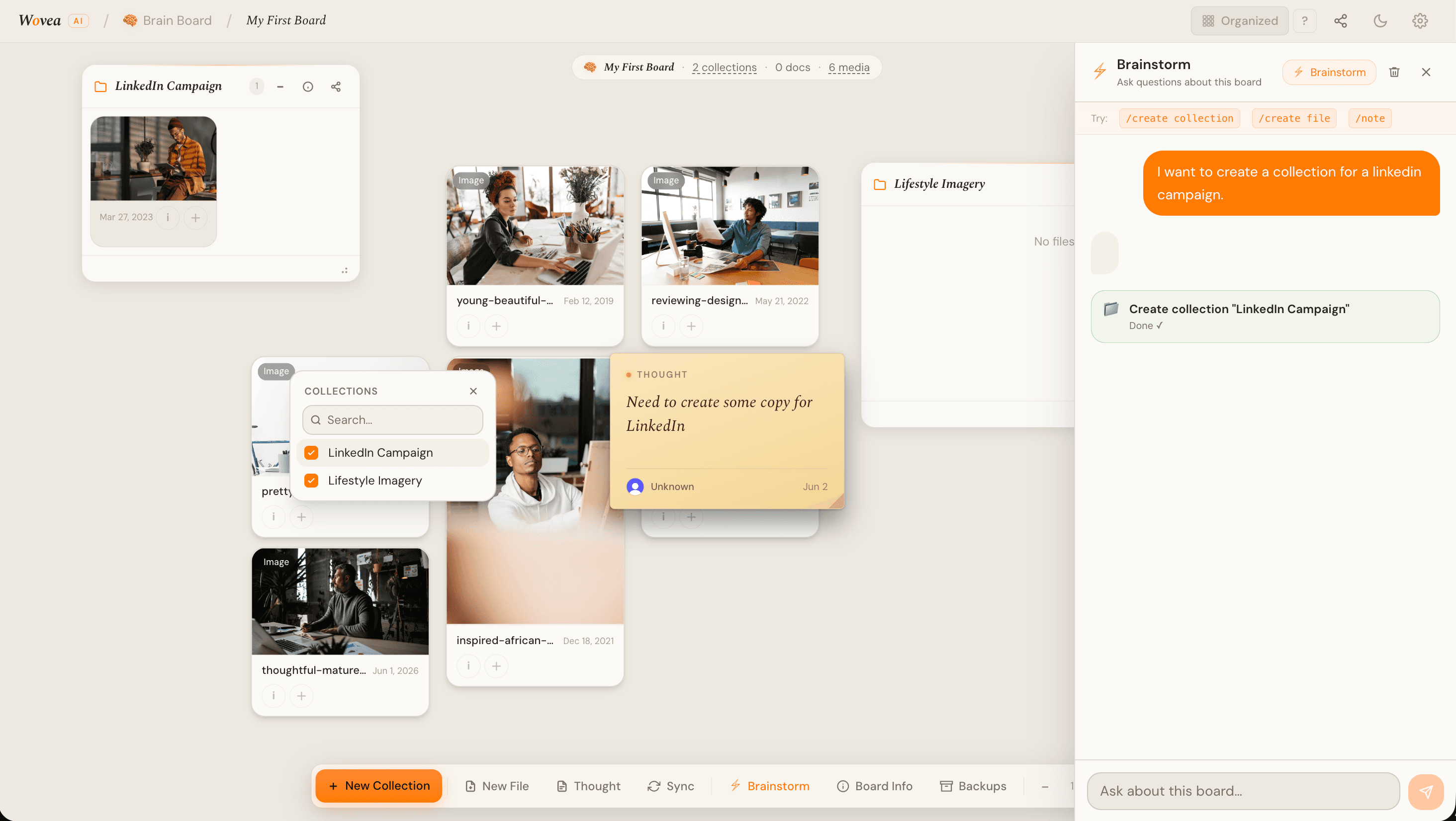
A board can be viewed two ways. Spatial is the default — a free-form canvas where you position cards anywhere and draw connections between them, the way your thinking actually branches. Organized lays the same cards out in a tidy grid, sorted into collections, for a quick scan or a simpler read. Switch between them any time from the toggle on the board; it's the same content underneath, just arranged differently.
Yes. Drop a video file onto a board and Wovea uploads and processes it in the background — you'll see a placeholder while it transcodes, then a full player once it's ready. You can trim a clip down to a snippet in the built-in editor, and ask AI to write a title and summary straight from the video's own transcript.
The Gallery is a curated set of public example boards you can browse for inspiration. Find one that fits what you're making and add it to your own workspace in one click — it copies in as a reference at no storage cost to you, so you can study or remix it freely.
Yes. Every board is backed up automatically overnight, and you can trigger a manual backup any time from the board's settings. If something goes wrong, you can restore a board from any past backup from the same place.
A word-processor-grade editor built for depth — headings, lists, quotes, code, highlights and inline media. It's the one light-on-white surface in an otherwise-dark app, designed to feel like a clean page.
Yes — paste straight from Google Docs and your formatting survives the trip. Headings, bold, links and lists all come across without the usual cleanup.
Drop images and video directly into the document, pull them in from a board, or paste a link. Media sits inline and keeps its place as you write around it.
Constantly. Every change is saved as you type — you'll see a quiet “Saved” in the footer. There's no save button to remember.
Wovea's AI works alongside you rather than taking over. It reads what's on a board, suggests themes and moods, spots connections between cards, and helps you draft, expand or rewrite in the editor — all without leaving your flow.
It offers, you decide. The AI surfaces suggestions — “these three cards share a theme,” “want to connect these two?” — as gentle prompts you can accept or dismiss. Your board is never rearranged without your say-so.
Yes. In the editor you can ask AI to draft from your research, continue a paragraph, expand a thought or rewrite a passage in a different tone. It pulls context from your board so suggestions are grounded in your material, not generic.
No. Your boards, files and writing are never used to train models. AI features run on your content only to serve you in the moment — see Privacy & data below.
Yes. Ask for a brainstorm on a board and AI proposes a batch of new cards, grouped into their own collection, based on what's already there. If the batch isn't a fit, one undo removes everything that run added — cleanly, with nothing left behind.
Open the share panel on any board or document, invite people by email, and pick what they can do. You can also turn on a public link to share with anyone, no account required.
Each collaborator gets a role that controls their access — view, comment or edit. Roles are set per board, so someone can co-edit one project while only viewing another.
Yes. Turn on a public link and anyone with the URL can view the board or published page — no sign-in, no friction. You stay in control and can switch the link off at any time.
When someone with a public link wants in, they can request to join. You'll see the request and can grant them a role with a click — handy for bringing collaborators on board at the right moment.
Yes — real-time collaboration is on for every plan. When you and a collaborator are in the same board, you'll see each other's cursor and live edits as cards move; in the writing editor, you can co-write the same document together, live, the way you would in a shared doc elsewhere.
Per-board sharing and roles work project by project. A Team is a persistent workspace — invite people once and share boards across the whole group, with team-level membership instead of re-inviting collaborators board by board. Teams are available on the Team plan; see Plans & privacy below.
Yes — Wovea is free to start, with everything you need to build your first boards. Paid plans add more storage and AI usage as you grow; you'll always know before anything changes.
The free plan comes with a generous storage and AI allowance. If you're doing something unusually large, paid plans lift the limits — and we'd love to hear what you're building.
Free to start, then Creator, Pro and Team as you grow — each step adds storage, AI headroom, and (on Team) shared seats. See the pricing page for what's included at each tier and current prices.
Paid plans are billed monthly or annually (annual saves you two months) through our secure payment processor, with tax applied automatically where required. Your plan renews on its own until you cancel.
Manage everything from Settings — upgrade, switch plans, update your card, or cancel in a couple of clicks. When you cancel, you keep your paid features until the end of the current billing period, then move back to the free tier.
We want Wovea to be worth it. Cancel anytime — you keep your paid features through the end of the current billing period, then return to the free tier, and we don't charge you again.
- 14-day money-back: if a new paid plan isn't for you, email us within 14 days of your first charge and we'll refund it in full.
- Monthly plans: you can cancel anytime before the next renewal, so renewals generally aren't refunded — but if you were charged by mistake (say you meant to cancel), contact us within 7 days and we'll review it.
- Annual plans: covered by the same 14-day money-back window; after that the term isn't pro-rated, but you keep full access until it ends.
- Duplicate or accidental charges are always refunded.
To request a refund or flag a billing issue, email info@wovea.ai — we usually reply within 1–2 business days.
Your work is yours. Downgrading keeps your content — you just return to free-tier limits (we'll prompt you if you're over them). If you leave entirely, you can export your boards and documents first, and we delete your content on request. We never hold your data hostage.
Your content is stored securely and is private to you and the people you share with. It's never sold, and never used to train AI models. Public links are the only things visible without an account — and only the boards you explicitly publish.
Loom — outputs & publishing
Turn a collection — or a whole board — into a finished, on-brand piece of content.
Read the guide →Loom is Wovea's engine for turning a collection into something finished and shareable — a published web page or a social set. Open the Share icon on any collection in Focus mode to get started.
Before Loom generates anything, it needs a design kit — the colors, fonts and voice it should use. Auto-generate one from the photos already in your collection, upload a kit as a .zip, or configure one by hand. Once it's set, every output from that collection picks it up automatically.
Yes. Describe a look in plain language — “warm faded 70s film,” “clean and minimal” — and Loom turns it into a preview you can accept or adjust. Or skip the back-and-forth and pick from a gallery of curated look templates. Either way, the preview is exactly what you'll export.
Yes — after Loom generates a first pass, everything lands in the Studio, where you can rewrite captions, swap photos, reorder panels, and regenerate anything you don't like. A web page publishes to a shareable link, and a social set downloads as an image set sized for the platform.